How to tweak Instagram's algorithm to show you the content you really want
Ever felt like social media sites don't really care about your interests anymore, instead showing you random stuff you don't even like? Instagram is taking some steps to change that.
Instagram chief Adam Mosseri announced the change on Threads on Wednesday, with Instagram adding a new feature called Your Algorithm.
"As software gets better at predicting what we want, our sense of agency gets smaller. The main feed on every major app is now mostly accounts you never decided to follow, surfaced by algorithms rather than your explicit choices," he wrote. No s***, Sherlock.
You May Also Like
The way to remedy that is through the Your Algorithm tool, which allows you to choose which topics you want to see in your Instagram feed. While this sounds like the same thing you go through when signing up for a new social site, Your Algorithm is a welcome change as these topics previously weren't explicitly visible on Instagram. It also gives you the option to choose the topics you don't want to see.
When I checked my Instagram to see which topics the algorithm was serving me, I've found several that were off the mark. For example, a topic that was included for me was "Muay Thai," and while I have nothing against this type of content, it's not something I actively want to see more of in my feed.
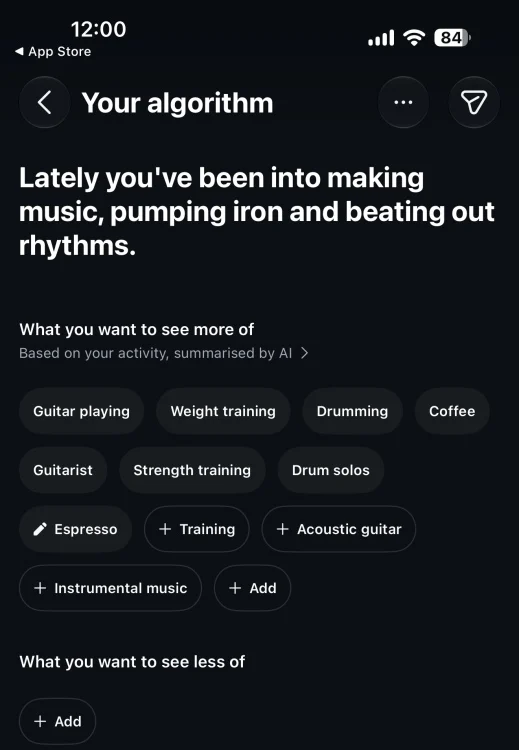
How to personalize your algorithm on Instagram
The Your Algorithm feature is easy to tweak, but it is buried pretty deep in Instagram's settings. Here's how to access it on your iPhone:
Open the Instagram app and tap the profile icon in the lower right corner.
Tap the three lines icon in the top right corner, scroll down, and tap on "Content preferences".
From here, tap on Your Algorithm, and pick the topics you want or don't want to see.
You'll notice that Instagram is surfacing several suggestions for you, but you're also free to tap "+ Add" and pick any topic you want.
Mosseri says that this is "the start of something bigger than a feature," and that more features are coming in the future, including setting moods, vibes, content types, and more.
Topics Instagram

Stan is a Senior Editor at Mashable, where he has worked since 2007. He's got more battery-powered gadgets and band t-shirts than you. He writes about the next groundbreaking thing. Typically, this is a phone, a coin, or a car. His ultimate goal is to know something about everything.

Source link